Wednesday, June 5, 2013

Difference between antcall and depends

Sometime we work without thinking much about the build script and other times we need to change the build scripts. At this time we start thinking about various functions in the language.

So today when I was modifying such build script, then I got stuck between the use of "depends" and "antcall". I did little bit of Googling and I got 2 nice articles.

It is not possible for me to elaborate all the uses of ‘depends’ and ‘antcall’ but I will try to provide little information on these targets.

Depends is an attribute of “target” target.

<target name=”runtarget” depends=”target1, target2, target3”  if="condition">

About specified line says before running “runtarget”, ant must execute target mentioned in the “depends” attributes. If condition is verified once all the targets mentioned in the “depends” attribute have already run.

So execution order will be as follows:
1.                   target1
2.                   target2
3.                   target3
                if(condition == true)
4.                   runtarget
                endif

Let’s take another example.
<target name="A"/>
<target name="B" depends="A"/>
<target name="C" depends="B"/>
<target name="D" depends="C,B,A"/>

In this case if target D is executed then it will run in the following order.
A -> B -> C -> D
In this case target will not be executed twice.

‘antcall’ is a target/task. It invokes another target which exists in the build xmls.

<antcall target=”target1”/>

In this case processing will switch to another target specified in the antcall. Let’s look at the an example to illustrate the functionality.
<target name=”target1” />
<target name=”target2” >
<antcall target=”target1”/>
</target>
<target name=”target3” >
<antcall target=”target1”/>
<antcall target=”target2”/>
</target>

Now on invoking target3, following will be sequence of run.
Target3 -> target1 -> target2-> target1

As you can see, target 1 is run twice as it will called by target 3 independently and target 2 also invoked target 1 internally. Whereas when such duplicity exists in target called by depends attribute, then ant resolves such duplicate target.

Uses of antcall and depends in one example
Requirement: I have to build a project and create a jar file. Building of this jar depends on already build 100+ jar files, which are at some remote location at the starting of the project. If these jar files do not exist locally, ftp these jar files from remote location.

Approach 1: We will copy the jar files irrespective of their existence.
Approach 2: We will check whether jar files exists, if not then we will copy them from server.

Solution:
Approach 1 is not only time consuming but also it involves the risk of copying the file from remote location, which may not exists at time.
Approach 2 is efficient and nice. So let’s write the code for this.

<target name=”CopyJarsFromServer”>
<!—code for copying the jar using ftp -->
</target>

<target name=”validatejars”>
<if condition>
<antcall target=”CopyJarsFromServer”/>
<!—these is not other way to do it without using ant call -->
<end if>
</target>

<!—We are using depends attribute as we want to make sure that jar exists before any actual processing starts -->
<target name=”build” depends=”validatejars”>
<!—relevant code to build the jar -->
</target>

Hurrey, Now I understand the difference between antcall and depends, and I hope you too. J

Misuse of antcall task may hamper efficiency of your build script as antcall task does allow you to control what properties and references are defined (which is why a new Ant environment is created--and why it's so slow) so it can be used to create variants of the same thing; e.g., maybe two jars, one with and one without debug symbols.

So use antcall task only if it is not possible to find a workaround using depends target.

If you didn’t like my explanation and wants to check actual links that I have used to understand the difference, then please visit the followings

Wednesday, May 22, 2013

Jboss Esb - Imported file can not be resolved


I was working on an application that was built in Jboss Esb. I changed my source code and uploaded the jar, which was built using ant files.

As soon as I uploaded the file, Jboss bombed while starting it. It threw the exception mentioned below
The import com.XYZ.adapter.abc cannot be resolved.

I am new to JBOSS Esb. It was an urgent requirement and I needed to fix it ASAP. I did not have any idea to solve the issue in JBOSS ESB. I was cusring JBOSS and developer who thought to use the application. So I had to depend on Mr Reliable Google.

I search on google, and most of the people said that I have not build the jar in the correct manner. Whereas I was sure that I have build it correctly. I researched more. When Google stopped responding to my queries with satisfactory answers, then I started searching the answers at my own, and finally I found the solution for the problem.

I found that my class file did not have corresponding import statement(Which I lost while merging the file with version control tool). But my question was then how I got jar file. So I troubleshooted the ant scripts and found following.

-> My ant script was not deleting old class files. So instead compiling java source file, it was zipping already compiled files.
-> My Eclipse project did not show error, because auto building was disabled.
-> My Eclipse project and Ant Script was building class file at the same location. I.e. Both were building at ${basedir}/bin.

Keep it in mind, whatever technology you are using, it is based on one specific language. Irrespective of technology, the language concepts will always hold true.

The import com.XYZ.adapter.abc cannot be resolved.

Error listed above shows that there are compilation problems with the jar, so rebuild the jar with additional care.

Wednesday, November 28, 2012

Setting crontab with Environment variables

Though I can boast of working on Ubuntu for past 1 year, but I am not quite handy in Linux/Unix. Very small tasks create different problems to me. Yesterday I was assigned to configure a crontab expression and test one application. But I was not able to define this crontab expression due to my negligence about CRONTAB_ENV.
I think lots of people, like me, face this issue while running crontab. So let's understand crontab environment. Let’s understand the intricacies of crontab.

Crontab
Crontab is a shell script to enable scheduling. We use crontab to configure the execution of any application periodically without any human intervention.
Each user has their own crontab, and commands in any given crontab will be executed as the user who owns the crontab.

Different options for Crontab
crontab -e Edit your crontab file, or create one if it doesn’t already exist.
crontab -l Display your crontab file.
crontab -r Remove your crontab file.
crontab -v Display the last time you edited your crontab file. (This option is only available on a few systems.)

Understanding and Setting crontab environment
Blank lines and leading spaces and tabs are ignored. Lines whose first non-space character is a pound-sign (#) are comments, and are ignored. Note that comments are not allowed on the same line as cron commands, since they will be taken to be part of the command. Similarly, comments are not allowed on the same line as environment variable settings.

An active line in a crontab will be either an environment setting or a cron command. An environment setting is of the form,
                 name = value
where the spaces around the equal-sign (=) are optional, and any subsequent non-leading spaces in value will be part of the value assigned to name. The value string may be placed in quotes (single or double, but matching) to preserve leading or trailing blanks. Several environment variables are set up automatically by the cron daemon.

SHELL is set to /bin/sh, and LOGNAME and HOME are set from the /etc/passwd line of the crontab’s owner. HOME and SHELL may be overridden by settings in the crontab; LOGNAME may not. In addition to LOGNAME, HOME, and SHELL, cron will look at MAILTO if it has any reason to send mail as a result of running commands in "this" crontab. If MAILTO is defined (and non-empty), mail is sent to the user so named. If MAILTO is defined but empty (MAILTO=""), no mail will be                sent. Otherwise mail is sent to the owner of the crontab.

The MLS_LEVEL environment variable provides support for multiple per- job SELinux security contexts in the same crontab.

Few environment variable can be defined in the cronfile. By default cron jobs do not consider USER defined variables, but you can explicitly tell it to use user defined variables.

0 5 * * * . $HOME/.profile; /path/to/command/to/run

Cron expression and fields


Field          Allowed Values
-----          --------------
Minute         0-59
Hour           0-23
Day of Month   1-31
Month          1-12, jan, feb, mar, apr, may, jun, jul, aug, sep, oct, 
               nov, dec
Day of Week    0-7, sun, mon, tue, wed, thu, fri, sat (0 and 7 are "sun")

So expression mentioned above says run the /path/to/command/to/run script at 5AM everyday.

Cron Security
Though each user has it's cron file, but few cron expression are accessible to different users. cron.deny and cron.allow files contain the user allowed to run an expression.

I will rest my case of cron expression now. I will update this if I get some more information about cron.

Monday, November 26, 2012

Compilation Error: Byte Operations b = b + 1

Yet we have worked so much in Java, but still we are not aware all intricacies of the languages. Even after knowing so much it seems comes up with something new to astonish me. It is like a disillusion charm, which keeps me under the covers.

Here we are talking about byte operations.

Create a class and type the following lines in a method.

byte b = 0;
b++;
b = b + 1;

Now you will realize eclipse shows a compile time error, but why it is not a consistent behavior between line 2 and line 3.

But we must understand the difference between these 2 operations.
Though in theory b++, b+1 are same statement, but for compiler those are not same statement. 

In case of b++, compiler knows the value of b and internally it is adding 1, whereas b + 1 is operation between a byte and an integer. Though 1 is constant, but compiler understands it as integer.

So we can make some change in code and it should work.

byte b = 0;
b++;
b = b + (byte) 1;

Still it is a compile time error. Now what? I have converted 1 to byte and I am adding 2 bytes, now what is the problem.

So the problem is compiler. For these operations(+ , -, *) it uses 4 bytes atleast, i.e. minimal results of these operations is int.

So b + (byte) 1; still results in integer, which must be type-casted to byte. So following code will work perfectly fine.

byte b = 0;
b++;
b = (byte) (b + 1);

If you finalize the byte variable, then it is possible to add two bytes without typecasting.

final byte b = 117;
final byte c = 10;
byte d = b + c;

In this case b, and c are constants and they values will not change after this operations. So compiler know that d = 127 which is maximum allowable byte. So it works without causing any issue.


final byte b = 118;
final byte c = 10;
byte d = b + c;

But at this time compilation fails as 128 is an integer not a byte, so compiler needs explicit downcast.


final byte b = 117;
final byte c = 10;
byte d =(byte)( b + c);

Byte operations and questions are tricky so keep such things in mind before answering them in interviews. I could not find the reference, but will post that reference soon.

Wednesday, October 31, 2012

LinkedList

As we were discussing Data structures earlier. So to continue the discussion on the same topic we will specific data structure in this post.

In this post we are planning to put some light on LinkedList. We will discuss various type of LinkedList and their implementation in Java. Lets get going to understand the simplest, but the most important data structure.

What is LinkedList?
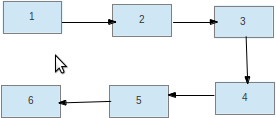
LinkedList is list of objects linked with each other. It is collection of object which can be accesses only in sequential manner.
Sounds nice, but I did not know what you mean.

As shown in the figure 1, 2, 3, 4, 5, and 6 are the elements. These elements are stored in a linked list. So to reach to 6 is not possible starting from 1 and traversing throw each of the nodes. Only information about the linked list stored is head of the list. if Link two nodes are broken than  it is not possible to accessible another node.
As shown in the figure 1, 2, 3 are accessible from the header but rest link is lost as there is no link between 3 and 4.

LinkedList representation on Java
As shown above a Node contains data and reference to another node. So if we need to think about the fields of a linked list, then Java class for linked list must be as mentioned below.

class LinkedList{
    int data;
    LinkedList next;
}

As mentioned each node contains the data and reference of another instance of the same class.

Imp Note: None of the programs listed below checks boundary conditions. While writing any program make sure to take them in consideration.
Operations
Add a data object at head.
Add a data object at tail.
Traverse to X location.
Delete the element at X location.
Search a value.

Add a data object at head: Worst Case O(1)
Create a Node and change Node's next to head. Point to Head to latest Node.


Now set new node next to header, but before doing so change new node's next to null.

addAtFront =>
LInkedList node1 = new LinkedList(19);
node1.next = header
header = node1

Add a Data object at rear: Worst Case O(n)
Instead adding to 19 to 1, add 19 after 6.
addAtRear =>

LinkedList node1 = new LinkedList(19);
while(!header.next == null) header = header.next
header.next = node1

By maintaining another instance object(tail) provides faster addition at rear. In general adding at rear is not so much needed.

Traverse to Xth element Worst Case O(X)
It is simple. You just to maintain traverse through X-1 nodes to reach to Xth element.

for( int count = 0; count < X - 1; count ++ ){
    head = head.next;
}
return head.data

Delete Xth element Worst Case O(X)
To delete Xth element you need to traverse to X-1th element and changing the reference of X-1 element to X+1 element instead Xth element.

for( int count = 0; count < X - 1; count ++ ){
    head = head.next;
}
head.next = head.next.next
Now as you can see 4 was earlier pointing to 5, but in the diagram showed above it is now pointing to 6 instead 5. So any link to 5 has been lost, so it is considered as deleted node.

Search A Value: Worst Case O(n)
Iterate over the linkedlist until you reach to either Null or required value. If you encounter NULL, it means LinkedList does not contain the value. In this case return -1, else return the position.
while( header != null && header.value != VAL ){
  header = header.next;
  count = count + 1;
}
return (header == null)? -1: count;

Many different data structures are implemented using linked list. Keeping link list in mind we must look for answers for these questions.
1.    Reverse a LinkList with single pointer in o(n) time…
2.       Linked List implementation of Queue
3.       Linked List implementation of Stack
4.       Finding the location of the list where loop was started.
5.       Write a function to return Nth node from the end of the linked list
6.       Write a function to swap every second node. [ie - 1->2->3->4->5->| becomes 2->1->4->3->5->|]

Type of Linked List
Singly Linked List
Linked implemented above is singly linked list. In this list traversal is possible only in one direction.

Doubly Linked List
It maintains 2 references to point in 2 directions. One to move forward and another to move backward.

class DoublyLinkedList{
    int data;
    DoublyLinkedList next;
    DoublyLinkedList previous;
}


Circular Linked List
This is another variant of Singly linked list. In this list last element of the list points to the first element of the list.

Thursday, October 25, 2012

Data Structures

Data structures are different ways of storing data. After various years of research many people have come up with the following different kind of DS. These different DS are used based on the requirement. DS is chosen based on the problem.

In this blog we will look at the different structures which are helpful to tackle various computing problem. I have tried to put little information about all DS available, In future I will try to explain each one of them with their various versions. Hope it will help me to understand DS more.

Data Structure Fields Operations Time Complexity Pros Cons Comments


Array MAX_CAPACITY add(index, value) – On the specified index add the value. O(1) Index based Retrieval 1. Fixed Size of Array. Arrays are the oldest and most DS. It is used to implement most of the other datastructures.

index delete(index) – Delete at specified index. O(1)
2. Complex position based insertion

objects[] search(value) – Search the value. O(n)
3. One block Allocation. It is not possible to use scattered memory with arrays


Linked List Node{ Data, nextNode} Insert – Add value at head. O(1) 1. Linear Access 1. Retrieval at any index is slower wrt to Arrays.

head of Node type Delete – Search and delete the value. O(n) 2. Does not need continuous memory locations. 2. Complex to use. Linked list are useful when user is concentrating on insert operation instead index based retrieval.


Search – Search the value. O(n) 3. Size of the list is not fixed.


Stacks MAX_CAPACITY IsEmpty – If CURRENT_INDEX = -1 O(1)

Stacks works on last in first out methodology... Stacks are widely used in computer programming.

CURRENT_INDEX isFull CURRENT_INDEX = MAX_CAPACITY O(1)

Stacks are used to validate compile time programs.

objects[] Push – Insert a object in array. O(1)

Infix/postfix/prefix evaluation is done using stacks.


Pop – removes a object and returns its value. O(1)


Queue MAX_CAPACITY isEmpty – If HEAD = TAIL O(1)

Queue works on First In/First out methodology.

HEAD isFull |HEAD - TAIL| = MAX_CAPACITY O(1)

Queue are used to maintain threads.

TAIL Enqueue – inserting the record at head. O(1)


objects[] Dequeue – Deletng the record from tail. O(1)


Tree Node{ Data, Node1, Node2, Node3 ....} add(value) – Based on property of the tree add the node accordinly. O(log(n)) 1. Insertion is faster than array but slower than linked list. 1. Difficult to maintain the balance of the tree. Trees are used for solving lot of algorithmic problems. It is known as most important and efficient data structure to solve multiple issues.

depth Delete – Search and delete the value. O(n) 2. Searching is faster. 2. Complex and confusion at times.

Leaves – Nodes which do not have any children. Search – Search the value. O(log(n)) 3. Used with lot of different data structures.


Internal Nodes – Nodes having one or more children.

4. Solves lot of problems.


Graph Map of vertices and it's accessible vertices. adjacent(G, x, y): tests whether there is an edge from node x to node y. O(K)

Graphs are generally used for greedy solutions.


neighbors(G, x): lists all nodes y such that there is an edge from x to y. O(K)

Shortest path algorithms.


add(G, x, y): adds to G the edge from x to y, if it is not there. O(K)


delete(G, x, y): removes the edge from x to y, if it is there. O(1)


HashTable objects[] add(value) – Adds the value to the array. O(1) Fast searching operations are performed. Need efficient hashing algorithms, otherwise it can be painful to search objects. It is widely used in Database Indexing and caching operations.

MAX_SIZE delete(value) – Removes the value from the array. O(1) Used when program deals with huge chunk of data.


Search(value) O(1)


Wednesday, October 17, 2012

English Grammar: Conjunction

This is another post about English Grammar. It was the time to understand conjunctions from Wren and Martin. In this blog we will try to understand and remember few fundamentals about conjunctions.

So let's start with the meaning for conjunction.

Conjunction is a word which merely joins either sentences or words.
It would be nice to see some example to support such a small statement.

God made the country and man made the town.
Here and connects between 2 sentences i.e. First is god made the country whereas second is man made the town.

Two and two make four.
Here and connects between 2 words i.e first word is Two and second is word is Two.

Ramsingh is 65 year old, but he still runs 5Km everyday.
But is connecting two statement.

Conjunction joins 2 statement and often make them more compact.
E.g. Raju is poor, but honest.
This statement can be restated as "Raju is poor, but he is honest."

To differentiate between relative Conjunctions, relative adverb, and proposition, we must put additional cares, as all of them are connecting words.

Conjunction classification

Coordinating Conjunction: Joins both the clauses of equal rank. These are divided in 4 forms.
A. Cumulative: and(Joins 2 sentences)
We are writing the message and watching the movie.
B. Adversative: But, Still, Only (express opposition and contrast between 2 statements)
Radha was Krishna's love, but not wife.
C. Alternative: Either or, Neither Nor.(Demonstrate the choice between 2 sentences)
Neither Ravan nor Ram was willing for a war.
D. Illative: For (Express an inference)
All precautions must have been neglected, for the plague spread rapidly.

Subordinating Conjunction: Joins a clause to another on which it depends on its full meaning. Subordinating conjunctions are classified further as follows:
A. Time: before, till, Since, after
I returned home after he has gone.
B. Cause or Reason: Because, Since, As
As he was not reading, I scolded him.
C. Purpose: So, Lest
We earn so that we can eat.
D. Result or Consequence: that
I was not so interested in book that I could read it.
E. Condition: if
Ram can write if Hari can dictate.
F. Concession: though/Although
I will not see him, though he comes.
G. Comparison: than
Sachin is better player than Kaif.

List of conjunction
But, either.. or, neither.. nor, whether... or, though... yet, that, before, how, as, unless, until, though, although, when, while, where, if, than, that, since, after, till, and, until, for, lest, still, only, yet, where, except, else, otherwise, whenever.

These are commonly used conjunctions in English language, if I find some more than I must add them to the list.

Let's discuss few important conjunctions are their uses.

Important Conjunctions and their uses

Since
A. From and after the time when; as
I have been praying for India since(I started praying when Sachin was out.) Sachin fell.

In such use of Since, it must be preceded by verb in present perfect form, and followed by verb in simple past tense.

B. Seeing that, in as much as; as
Since(Seeing that) you are tired, you must rest.

Or
A. To introduce an alternative.
You must work or starve.
B. To introduce an alternative name or synonym.
Ram or Shyam play today cricket game.
C. To mean otherwise.
We must hasten or night will overtake us.
D. As nearly equivalent to and.
The troops were not in wanting in strength or courage, but they were badly fed.

If
A. Condition/Supposition
If he is there, I shall see him.
B. Admitting
If I am blunt, I am atleast honest.
C. Whether
I asked him if he have a pen.
D. Whenever
If I feel any doubt I inquire.

That
A. Reason or Cause
He was annoyed that he lost the bet.
B. Express a purpose
We sow that we may reap.
C. Express a Consequence
He bled so profusely that he died.

Than
Follows adjectives and adverbs in the comparative degree.
Cricket is watched more than any other game in India.

Lest
Expresses a negative purpose, and is equivalent to 'In order that... not', 'for fear that'.
He fled lest he should be killed.

While
A. During the time that, as long as
While there is life there is hope.
B. At the same time that.
The girls sang while the boys played.
C. Whereas
While I have no money to spend, you have nothing to spend on.

Only
As a conjunction, means except that, but, were if not.
A very pretty woman, only she squints a little.

Because. for, Since

Rest other conjunctions are not discussed here, but if I find something else must be discussed I will surely add them to the list.

Friday, September 28, 2012

English Grammar: Adverb

I never planned to mix so many type of contents on the same page, but when I did not find any better option or platform to keep this information handy then I took brave step to mix grammar with programming.

Today I read (Wren & Martin) adverbs a little. So I thought to pen down the information gained, instead losing it with time.

At first we must know the meaning of our subject. So what is an Adverb?

Book says, An Adverb is a word which modifies the meaning of a Verb, an Adjective, or another Adverb.

Okay, definition is perfectly fine, but what it means. Hmmm, let's look at some examples.

Rama cooks well, but drives terribly.
So well and terribly suggests Rama's manner of cooking(Verb) and driving respectively.

Rama is eating very sweet mango.
Very is demonstrating the degree of sweetness(Adjective).

Rama reads quite clearly.
Clearly tells the manner of Rama's reading, and quite displays degree of clarity (Adverb).

Now I know a little about adverbs. Now let's try to find different categories of adverbs.

Adverb of Time
Few adverb of time are before, now, lately, daily, already, since, late, age, soon and yesterday. These words are generally placed after the verb, or object if exists.
E.g.
I reached office late.
I did not attend any class yesterday.

Adverb of Frequency
Examples of such adverbs are twice, thrice, never, seldom, after, again and frequency. These words are generally placed between subject and verb if and only if the verb consists of one word, otherwise word is placed after first verb.
E.g.
He seldom drinks vodka.

Adverb of Place
Here, there, everywhere, anywhere, somewhere, up, down, away, and backward such words belongs to this catagory. These words are generally placed after the verb, or object if exists.
E.g.
He does not go anywhere.
He was here.
My brother is out.

Adverb of Manner
clearly, well, soundly, sadly, slowly, and many other such words belongs to Adverb of manner. These words are generally placed after the verb, or object if exists.
E.g.
You have been speaking clearly.
Ram acted well.

Adverb of Degree or Quantity
too, any, almost, fully, very, enough, and similar words lie in this category. These words are generally placed between subject and verb if and only if the verb consists of one word, otherwise word is placed after first verb.
E.g.
Anil was fully aware of his wrong doing.
Food was good enough for two persons.

Adverb of Affirmation or Negation
Surely, certainly, not, and other similar words come under this category.
E.g.
Surely I can reach office in time.

Adverb of Reason
Hence, therefore lies in this category.
E.g.
He is hence unable to refute the charge.

Some of these adverbs may belong to more than one categories. So while positioning them it is mandatory to figure out their category based on sentence structure, and position them accordingly.

Few other rules which must be kept in mind while positioning adverbs in the sentence.
1. When there are two or more adverbs after a verb, the normal order is: Adverb of Manner, Place and Time.
E.g.
He spoke earnestly in the meeting yesterday. 

2. If the verb is am/are/is/was, these adverbs are placed after the verb.
E.g.
I am never late for school.
We are just off.

3. Have to and used to prefer adverb in front of them.
E.g.
I often have to go to college on foot.

4. An adverb modifying an adjective or another adverb should precede modified content.
E.g.
Rama is rather lazy boy.

5. Enough is placed after the word it modifies.
E.g.
He spoke loud enough to be heard.

6. Word only, should be placed immediately before the word it modifies.
E.g.
He has slept only three hours.

My book tells few more rules, but keeping this much in mind will change lot of things for me. I have left few things intentionally to keep the article shorter and informative.

I enjoyed this exercise after reading so much about adverb.
http://www.myenglishgrammar.com/exercise-4-adverbs.html

Tuesday, July 31, 2012

Eclipse Starting with a Specific workspace


As I am working for different client at one given point of time, so sometimes it becomes cumbersome to switch the workspaces for different clients. Even sometime it is mandatory to open more than one eclipse and work with them in parallel. So managing them and switching between workspaces not only consumes times but also irritates.

I wanted to tackle this issue by creating different shortcuts for each workspace. Eclipse has easy solution for my problem.

To create shortcut to open eclipse with a particular workspace follow the steps mentioned below.

1. Browse to eclipse installation folder and right click on eclipse.exe.


2. You will see a shortcut at your desktop. Open the shortcut properties menu which pops up a shortcut properties.

3.In the target add the following text -data <YOUR_WORKSPACE_LOCATION>


4.Click on OK.

Now once you click on the shortcut, it would not prompt you to select the workspace and it will open the workspace associated to the location specified.
Now you can create as many as shortcut you want and refrain from switching between the different workspaces.