Showing posts with label Java. Show all posts

Friday, December 25, 2015

Amazon Interview 1: Problem 2

Problem 2: Given two linked lists. Each node stores a single digit. Each linked list this way represents a decimal number, with number of digits = number of nodes in the list. You need to add them to produce a third list which represents the sum of the numbers.

Problem statement would be complete only if we know the how decimal numbers are represented in the list.


To represent .123 the list is 1 -> 2-> 3


To add 2 numbers, you must consider the following scenario:


List 1 = 4 -> 5 -> 6

List 2 = 6 -> 9

Returned list should be 1 -> 1 -> 4 -> 6 (Though if this is considered only decimal number, it would be incorrect) but for time being let's consider this as a solution.


Solution 1: Modify the shorter list to append the '0' (Zero) to make both the lists size equal. For each list reach to ith location (1 <= i <= N ) starting from the Size of the list and add both the lists. If sum is greater than one use carry to add (i - 1) position.


List 1 => 4 -> 5 -> 6

List 2 => 6 -> 9 -> 0

When I = 3 (Iteration to reach 3rd position = 3)

List 3 => 6
Carry = 0

When I = 2 (Iteration to reach 3rd position = 2)

List 3 => 4 -> 6
Carry  = 1

When I = 1 (Iteration to reach 3rd position = 1)

List 3 => 1 -> 4 -> 6
Carry = 1

Exit the loop and add carry to list 3

List 3 => 1 -> 1 -> 4 -> 6

Time Complexity: 3 + 2 + 1 (N = 3)

Time Complexity for N elements: N + (N-1) + .... + 1 = N(N+1)/2 = O(N*N)

Time complexity of the above solution is O(N*N)


Solution 2: You can even reverse the lists and add them simply. But reversing the list would also require O(N*N) time complexity, and you would change the original structure of the input which is not desirable.


Solution 3: Here is another idea which performs better in normal circumstances, whereas in worst case it has same O(N*N) time complexity.


Logic
 method add start
  input list1 and list2
  minLength = find the smaller length of both the list
  assign a boolean array of len = minLength
  create a node with sum of list1 and list 2 digit mod 10
  array[0] = assign true if sum is greater than zero
  repeatTill = array[0] == true? 0:-1;
  for element from 1 to min length
   create a node with sum of list1 and list 2 digit mod 10
   array[element] = assign true if sum is greater than zero  
   repeatTill = array[element] == true? element:repeatTill;
  end for
  assign the remaining elements of the longer list to new list
  call recursive method to update the carries
 end
 
 method updateCarries start
  input list3, boolean[] array, repeatTill
  if repeatTill is negative then
   return list3
  end if
  if array[0] is true then
   add Node with digit 1 at front of the list
  end if
  for element from 1 to repeatTill
   if array[element] is true then
    assign repeatTill if array[element-1] is true
    update values
   end if
  end for
  return call updateCarries
 end


This solution's best case is O(N) when there is no carry in these two digits. For Example when 123 and 234 are added. In this case, loop is iterated only once.

Whereas in the worst case it will run for O(N*N). That would be most unusual addition. For Example when 9999 and 0001 are added. In this case, N*(N+1)/2 elements are accessed.

Java code for the solution is as following:

Java Code
import java.io.BufferedReader;
import java.io.IOException;
import java.io.InputStreamReader;

/**
 * Problem: Given two linked lists. Each node stores a single digit. Each linked
 * list this way represents a decimal number, with number of digits = number of
 * nodes in the list. You need to add then to produce a third list which
 * represents the sum of the numbers.
 * 
 * E.G. LinkedList 1 -> 2 -> 6 LinkedList 3 -> 8
 * 
 *
 */
public class SumDecimal {

 /**
  * This method reads the input and prepares the array and call the relevant
  * method.
  * 
  * @param args
  * @throws IOException
  */
 public static void main(String[] args) throws IOException {

  BufferedReader br = new BufferedReader(new InputStreamReader(System.in));
  String line = br.readLine();
  /**
   * N is the number of test cases.
   */
  int N = Integer.parseInt(line);
  for (int i = 0; i < N; i++) {
   String[] list1Values = br.readLine().split(" ");
   String[] list2Values = br.readLine().split(" ");
   Node list1 = null;
   for (int index = list1Values.length - 1; index >= 0; index--) {
    Node n = new Node(Integer.parseInt(list1Values[index]));
    n.next = list1;
    list1 = n;
   }
   Node list2 = null;
   for (int index = list2Values.length - 1; index >= 0; index--) {
    Node n = new Node(Integer.parseInt(list2Values[index]));
    n.next = list2;
    list2 = n;
   }
   Node list3 = add(list1, list2);
   System.out.println(list3);
  }
 }

 private static Node add(Node list1, Node list2) {
  int minLength = 1;
  Node l1 = list1;
  Node l2 = list2;
  while (l1.next != null && l2.next != null) {
   minLength++; // M or N whatever is smaller.
   l1 = l1.next;
   l2 = l2.next;
  }
  boolean[] carries = new boolean[minLength];
  Node list3 = new Node((list1.digit + list2.digit) % 10);
  Node list = list3;
  carries[0] = (list1.digit + list2.digit) / 10 == 0 ? false : true;
  int toMove = carries[0] ? 0 : -1;
  for (int index = 1; index < minLength; index++) {
   Node n = new Node((list1.next.digit + list2.next.digit) % 10);
   carries[index] = (list1.next.digit + list2.next.digit) / 10 == 0 ? false : true;
   list1 = list1.next;
   list2 = list2.next;
   list3.next = n;
   list3 = list3.next;
   toMove = carries[index] ? index : toMove;
  }
  if (list1.next != null) {
   list3.next = list1.next;
  } else {
   list3.next = list2.next;
  }
  list = updateCarries(list, carries, toMove);
  return list;
 }

 private static Node updateCarries(Node list3, boolean[] carries, int toMove) {
  if (toMove == -1)
   return list3;
  int nextMove = -1;
  Node list = list3;
  if (carries[0]) {
   Node n = new Node(1);
   n.next = list3;
   list = n;
   carries[0] = false;
  }
  for (int index = 1; index <= toMove; index++) {
   if (carries[index]) {
    int sum = list3.digit + 1;
    carries[index - 1] = sum == 10 ? true : false;
    list3.digit = sum % 10;
    carries[index] = false;
    nextMove = carries[index - 1] ? index - 1 : nextMove;
   }
   list3 = list3.next;
  }
  return updateCarries(list, carries, nextMove);
 }

 static class Node {
  int digit;
  Node next;

  Node(int digit) {
   this.digit = digit;
  }

  public String toString() {
   return (next == null) ? digit + "" : digit + " " + next.toString();
  }
 }

}


Input
7
1 2 3
2 3 4
3 4 5
3 4 5
9 9 9
0 0 1
9 0 0
1 9 9
9 8 1
1 2
1 2 6 8 9 6 7 8 9
9
1 2 6 8 9 6 7 8 9
9 8 4 2 1 4 3 8 7

Output
3 5 7
6 9 0
9 9 9
1 0 9 9
1 1 0 1
1 0 2 6 8 9 6 7 8 9
1 1 1 1 1 1 1 1 7 6

If you feel that something is not correct with the solution, let me know. I would try to fix the problem.

Tuesday, January 7, 2014

Generics: Bridge Method

I was thinking to improve my algorithmic fundamentals, so I planned to make few notes for myself that will assist me in future (Obviously at the time of Interviews). Following questions and answers have been taken from stackoverflow.com. This post is a sticky notes post for me. Please do not use the answers for reference purpose.

Generics were introduced in Java in 1.5. It provided a tool to handle the casting related problems at the time of run times. With the use of generics ClassCastException has been reduced.

Earlier versions of Java 5 did not impose such generic restrictions, so programmer used to face various casting related problems.

Java 1.4 and prior version were using following formats. There were 2 main issues with these formats.
List list = new ArrayList();//Any class extending Object can be added to list.
list.add("hello");
String s = (String) list.get(0);//Explicit type casting is required.


Java 5 introduced generics which used to type safe the collection objects.
List list = new ArrayList();//Type-safe, it is required to add strings only.
list.add("hello");
String s = list.get(0);   // no cast

What did Java introduce to deal with Generics?
Nothing, While creating the byte code, it removed all generic and replace them with actual classes. So byte code for Java 1.4 version and Java 5 version will remain same. This process called 'ERASUR'.
List list = new ArrayList();
list.add("hello");
String s = (String)list.get(0);

For both the versions following runtime code will execute.

Type Erasur can fail in some conditions, one of such condition is as follows. (Example is taken from Oracles docs)
public class Node {
    private T data;
    public Node(T data)
{ this.data = data; }

    public void setData(T data) {
        System.out.println("Node.setData");
        this.data = data;
    }
}

public class MyNode extends Node {
    public MyNode(Integer data) { super(data); }

    public void setData(Integer data) {
        System.out.println("MyNode.setData");
        super.setData(data);
    }
}

MyNode mn = new MyNode(5);
Node n = mn;            // A raw type - compiler throws an unchecked warning
n.setData("Hello");     // Causes a ClassCastException to be thrown.
Integer x = mn.data;

After Type Erasur code becomes as following.
MyNode mn = new MyNode(5);
Node n = (MyNode)mn;         // A raw type - compiler throws an unchecked warning
n.setData("Hello");
Integer x = (String)mn.data; // Causes a ClassCastException to be thrown.

Bridge Method?
When compiling a class or interface that extends a parameterized class or implements a parameterized interface, the compiler may need to create a synthetic method, called abridge method, as part of the type erasure process. You normally don't need to worry about bridge methods, but you might be puzzled if one appears in a stack trace.

After type erasure, the Node MyNode classes become:
public class Node {

    private Object data;

    public Node(Object data) { this.data = data; }

    public void setData(Object data) {
        System.out.println("Node.setData");
        this.data = data;
    }
}

public class MyNode extends Node {

    public MyNode(Integer data) { super(data); }

    public void setData(Integer data) {
        System.out.println(Integer data);
        super.setData(data);
    }
}

After type erasure, the method signatures do not not match. The Node method becomes setData(Object) and the MyNode method becomes setData(Integer). Therefore, the MyNode setData method does not override the Node setData method.
To solve this problem and preserve the polymorphism of generic types after type erasure, a Java compiler generates a bridge method to ensure that subtyping works as expected. For the MyNode class, the compiler generates the following bridge method for setData:
class MyNode extends Node {

    // Bridge method generated by the compiler
    //
    public void setData(Object data) {
        setData((Integer) data);
    }

    public void setData(Integer data) {
        System.out.println("MyNode.setData");
        super.setData(data);
    }

    // ...
}
As you can see, the bridge method, which has the same method signature as the Node class's setData method after type erasure, delegates to the original setData method.

Note: In this post everything is copied from Java Docs.

Wednesday, October 31, 2012

LinkedList

As we were discussing Data structures earlier. So to continue the discussion on the same topic we will specific data structure in this post.

In this post we are planning to put some light on LinkedList. We will discuss various type of LinkedList and their implementation in Java. Lets get going to understand the simplest, but the most important data structure.

What is LinkedList?
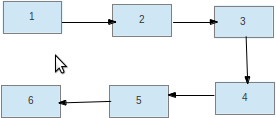
LinkedList is list of objects linked with each other. It is collection of object which can be accesses only in sequential manner.
Sounds nice, but I did not know what you mean.

As shown in the figure 1, 2, 3, 4, 5, and 6 are the elements. These elements are stored in a linked list. So to reach to 6 is not possible starting from 1 and traversing throw each of the nodes. Only information about the linked list stored is head of the list. if Link two nodes are broken than  it is not possible to accessible another node.
As shown in the figure 1, 2, 3 are accessible from the header but rest link is lost as there is no link between 3 and 4.

LinkedList representation on Java
As shown above a Node contains data and reference to another node. So if we need to think about the fields of a linked list, then Java class for linked list must be as mentioned below.

class LinkedList{
    int data;
    LinkedList next;
}

As mentioned each node contains the data and reference of another instance of the same class.

Imp Note: None of the programs listed below checks boundary conditions. While writing any program make sure to take them in consideration.
Operations
Add a data object at head.
Add a data object at tail.
Traverse to X location.
Delete the element at X location.
Search a value.

Add a data object at head: Worst Case O(1)
Create a Node and change Node's next to head. Point to Head to latest Node.


Now set new node next to header, but before doing so change new node's next to null.

addAtFront =>
LInkedList node1 = new LinkedList(19);
node1.next = header
header = node1

Add a Data object at rear: Worst Case O(n)
Instead adding to 19 to 1, add 19 after 6.
addAtRear =>

LinkedList node1 = new LinkedList(19);
while(!header.next == null) header = header.next
header.next = node1

By maintaining another instance object(tail) provides faster addition at rear. In general adding at rear is not so much needed.

Traverse to Xth element Worst Case O(X)
It is simple. You just to maintain traverse through X-1 nodes to reach to Xth element.

for( int count = 0; count < X - 1; count ++ ){
    head = head.next;
}
return head.data

Delete Xth element Worst Case O(X)
To delete Xth element you need to traverse to X-1th element and changing the reference of X-1 element to X+1 element instead Xth element.

for( int count = 0; count < X - 1; count ++ ){
    head = head.next;
}
head.next = head.next.next
Now as you can see 4 was earlier pointing to 5, but in the diagram showed above it is now pointing to 6 instead 5. So any link to 5 has been lost, so it is considered as deleted node.

Search A Value: Worst Case O(n)
Iterate over the linkedlist until you reach to either Null or required value. If you encounter NULL, it means LinkedList does not contain the value. In this case return -1, else return the position.
while( header != null && header.value != VAL ){
  header = header.next;
  count = count + 1;
}
return (header == null)? -1: count;

Many different data structures are implemented using linked list. Keeping link list in mind we must look for answers for these questions.
1.    Reverse a LinkList with single pointer in o(n) time…
2.       Linked List implementation of Queue
3.       Linked List implementation of Stack
4.       Finding the location of the list where loop was started.
5.       Write a function to return Nth node from the end of the linked list
6.       Write a function to swap every second node. [ie - 1->2->3->4->5->| becomes 2->1->4->3->5->|]

Type of Linked List
Singly Linked List
Linked implemented above is singly linked list. In this list traversal is possible only in one direction.

Doubly Linked List
It maintains 2 references to point in 2 directions. One to move forward and another to move backward.

class DoublyLinkedList{
    int data;
    DoublyLinkedList next;
    DoublyLinkedList previous;
}


Circular Linked List
This is another variant of Singly linked list. In this list last element of the list points to the first element of the list.

Tuesday, July 31, 2012

Eclipse Starting with a Specific workspace


As I am working for different client at one given point of time, so sometimes it becomes cumbersome to switch the workspaces for different clients. Even sometime it is mandatory to open more than one eclipse and work with them in parallel. So managing them and switching between workspaces not only consumes times but also irritates.

I wanted to tackle this issue by creating different shortcuts for each workspace. Eclipse has easy solution for my problem.

To create shortcut to open eclipse with a particular workspace follow the steps mentioned below.

1. Browse to eclipse installation folder and right click on eclipse.exe.


2. You will see a shortcut at your desktop. Open the shortcut properties menu which pops up a shortcut properties.

3.In the target add the following text -data <YOUR_WORKSPACE_LOCATION>


4.Click on OK.

Now once you click on the shortcut, it would not prompt you to select the workspace and it will open the workspace associated to the location specified.
Now you can create as many as shortcut you want and refrain from switching between the different workspaces.

Saturday, May 12, 2012

Remote Debugging

Coding is simple, but it get tougher when something does not work as our normal human mind expects it to work. We wonder in woods, we shut the mind and go out for smoke, then we go to seniors to test their potential to attack and solve the problem and if every door closes on you then debugging comes to rescue each of us.
Now problem and tension aggravate when we could not find any issue on local machine whereas same code bombs at production environment. Oh god, no-one can really rescue the server and customer as some witch has modified the computer language to perform it abruptly.
Again we have rescuer. Different IDE can rescue us from this situation by using remote debugging. Local debugging is not as cumbersome as remote debugging. It takes few configurations to enable remote debugging.
Lets look into remote debugging configurations.

Configure Eclipse Project for Remote Debugging

Open Debug configurations under Run menu.

This will open a dialogue as shown below

Right click on REMOTE JAVA APPLICATION and click on new. It will open an editable box to configure properties for remote debugging.

Enter the name of the debug configuration. Do not forget to change the Host and port properties. Make the changes and click on apply button. Make sure to remember port number as this port number will be used at the time of configuring java application at server.

Apply the setting and closed the window.

Configure Java Application Running at Server
Actually you do not need any configurations. To run the java application you need to pass following JVM Options.
-Xdebug -Xrunjdwp:transport=dt_socket,address= {PORT_NUMBER_PASSED},server=y,suspend=y

 If earlier the command used to run java application was
java testJava
Now it will be modified to
java testJava -Xdebug -Xrunjdwp:transport=dt_socket,address={PORT_NUMBER_PASSED},server=y,suspend=y

Explanations
All options mentioned above will decide how application will run in debug mode.

Make a note of following points below:
* jdwp- (Java Debug Wire Protocol) this protocal enable your debugger(eclipse) to debug remote VM.
-Xrunjdwp: enables the jdwp for u
* -Xdebug  will start java application in debug mode .

Remaining jdb parameters will specify how application will run.
* suspend = y - Applicaion will not start until eclipse remotely connect to it.
* suspend =n - Application will start normally and it will stop at breakpoints
* transport = dt_socket will instruct jvm that debugger connections will be made through a socket
* server = n Attach to the debugger application at the specified address.
* server = y listen for connection at this address.
* 1044 is default port, this is transport address for connection.

This was simple but it may take some time to configure the application if you are running it for the first time. Have patient and try again it will work. There is not anything else you need to do. Configuring remote application has troubled me in the past and gives scare now also. But believe it is not rocket science.

Friday, August 5, 2011

Java: Pass by Value

I was in an interview and interviewer asked me the following question.

public static void main(){
          String s1 = "A";
          s1 = s1 + 1;
          System.out.println("Before function call S1 is:" + s1);
          modifyString(s1);
          System.out.println("After function call S1 is:" + s1);
}

String modifyString(String a){
          a = a + 2;
          return a;
}

What is the output of the following problem?

Though I knew Java is pass by value but at the time of function call Java passes memory reference of the objects. So with the conviction I wrote the output of the program.

Before function call S1 is: A1
After function call S1 is: A12

Interview was over, I returned home, wrote the program and ran it in my eclipse. Bomb... It exploded. Results were not as I expected. WTF, why are those results not the same as I expected? I am the Java bond I can not be wrong. Instantaneously I pinged for an assistance. I wanted to hear "there is a problem with my eclipse instance. I should dump the current eclipse and take the latest eclipse soon." But instead hearing those words  I got following response.

Before function call S1 is: A1
After function call S1 is: A1

My expectation were shattered and I started arguing. Argument ended with my broken believe and I figured out "I have to cover a lot more about java fundamentals".

Anyways let me tell  you how does java pass the object to the function. In general java do not differentiate between Objects and primitive data type. It uses copy operation to pass the value of both type of data types.
If you have overridden copy method of your class then java will copy the object based of your implementation otherwise it will copy the object shallowly, in other words we say java uses shallow copy functionality of the objects. In case of shallow copy it creates a new reference to the object passed to the method. Now whenever you change in this method, are reflected back in the mutable classes, whereas in case of immutable classes it is not possible to change the object so we refrain ourselves to changing anything in those classes.

Lets review the following program.


public class PassByValueInJava {

int xy = 0;
private static void modifyPav(PassByValueInJava pav3 ,PassByValueInJava pav4) {
int temp  = pav3.xy;
pav3.xy = pav4.xy;
pav4.xy = temp;
}

public static void main(String[] args) {
PassByValueInJava pav1 = new PassByValueInJava();
PassByValueInJava pav2 = new PassByValueInJava();
pav1.xy = 10;
pav2.xy = 20;
System.out.println("Before Modify:::: pav1 x:" + pav1.xy + "   pav2 x:" + pav2.xy);
modifyPav(pav1, pav2);
System.out.println("After Modify::::pav1 x:" + pav1.xy + "   pav2 x:" + pav2.xy);
}

}


Can you guess what is the output of the program written here?
After seeing the above example I thought it should not switch the values. So results should be the following
Before Modify:::: pav1 x:10 pav2 x:20
After Modify:::: pav1 x:20 pav2 x:10

Now it is strange. Why did swapping happened? Was there something different?

Okay, lets analyze what has happened in this program? Main function calls the modify function and providing them the copy of pav1 and pav2. As copy is a shallow copy, so in this case Java will create a reference which will point to the same memory location of the previous object. Memory location depicts the situation well here.

Why did not same thing happened when string object was passed to the method.
As string in java are immutable so java deals with string in a different manner. Initially when S1 = A then string was pointing to one memory location and as soon as S1 = S1 + 1, it creates new string object and S1 was assigned to it.

Now when Main called modify function s1 was pointing to A1 memory location whose reference was passed to modify function. When string s2 got changed, then it started pointing to the A12 string object's memory location. But s1 is still pointing to the A1 string object's memory location. That is why value for s1 did not modify.

So it is clear that java always uses pass by value and as java tackles string in a complete different way, this is the reason we see such a huge difference between objects and strings.

Program mentioned above could enhance with the following


public static void main(){
          String s1 = "A";
          s1 = s1 + 1;
          System.out.println("Before function call S1 is:" + s1);
          s1 = modifyString(s1);
          System.out.println("After function call S1 is:" + s1);
}

String modifyString(String a){
          a = a + 2;
          return a;
}

It will result in the expected output.

Sunday, October 24, 2010

Design Pattern-2

As it was not possible to cover all the pattern in the previous post. In this post I am going to summarize the other design patterns.
Structural Patterns
Adapter: This pattern is called Wrapper pattern as well. Using this pattern, one class is made compatible with another class. For example, interface X defines 2 methods get and put. Class LegacyClass has methods implementing the required functionality but as LegacyClass can not implement newly defined interface X. So there is a need to wrap LegacyClass with Interface. Adapter pattern will provide the solution to break the ice.
Bridge: This pattern is to provide encapsulation, inheritance and abstraction to the code. In this pattern one interface is given whose implementation can be provided at lower class hierarchy keeping it hidden from the client.
Composite: Composition of no of objects to form an object. This pattern suggests to use numerous objects to create one object.
Decorator: The decorator pattern can be used to make it possible to extend (decorate) the functionality of a certain object at runtime, independently of other instances of the same class, provided some groundwork is done at design time. This is achieved by designing a new decorator class that wraps the original class.
Facade: Provide one unified interface to a set of interfaces. This unified interface works at higher level and it makes it easy to use all the interfaces at once.
Flyweight: A flyweight is an object that minimizes memory use by sharing as much data as possible with other similar objects; it is a way to use objects in large numbers when a simple repeated representation would use an unacceptable amount of memory.
Private Class Data: This pattern primarily deals with encapsulation to hide the data.
Proxy: A proxy, in its most general form, is a class functioning as an interface to something else. The proxy could interface to anything: a network connection, a large object in memory, a file, or some other resource that is expensive or impossible to duplicate.

Behavioral patterns
Chain of responsibility pattern: This pattern is a source of command object and series of processing objects. Each processing object contains a set of logic that describes the types of command objects that it can handle, and how to pass off those that it cannot handle to the next processing object in the chain. A mechanism also exists for adding new processing objects to the end of this chain.
Command pattern: In this pattern object stores the information to invoke the method at later point of time. The information stored is method’s name. parameters and object to which method belongs to. There are 3 components of the pattern:
  • Client: Instantiate a command object and provide the information required to call the method at later point of time.
  • Invoker: Class which decides when to call the method.
  • Receiver: Object having method.
Interpreter pattern: Rules to identify the sentence in language. This pattern is generally used when someone needs to implement own parser.
Iterator pattern: There are aggregated data and there is need to access the data sequentially. So with exposing the internal DS, the same problem is solved by iterator patterns. Java collection API uses iterator pattern.
Mediator pattern: It is very similar facade patterns, where unified interface is exposed by extending numerous interfaces in the subsystem. This pattern is used in these circumstances.
  • Partition a system into pieces or small objects.
  • Centralize control to manipulate participating objects(a.k.a colleagues)
  • Clarify the complex relationship by providing a board committee.
  • Limit subclasses.
  • Improve objects re-usabilities.
  • Simplify object protocols.
  • The relationship between the control class and other participating classes is multidirectional.
Memento pattern: This pattern provide the ability to roll back. Here you will keep 2 states of an object one that is original i.e. anything before changes whereas other object will have latest copy with updates. This pattern is utilized in database updates.
Null Object pattern: Pattern just portrait the behavior of nothing.
Observer pattern: In this pattern a object keeps the list of its dependent, called observer. Whenever changes happened in the object its observer are notified by calling some methods. In general this pattern is used in event handling.
Weak reference pattern: A WeakReferencePattern is a structural pattern used when decoupling of an observer (a view) from an observable (a container) is necessary. A WeakReferencePattern encapsulates a reference to an object. Acquiring the reference is done through a message to the WeakReference (or WeakPointer) object. If the referenced object still exists, a real reference to it is returned. This reference is of course a temporary one.
State pattern: As the state of the object changes behavior is changed. Behavior is changes with if and else statements.

Strategy pattern: The strategy pattern is intended to provide a means to define a family of algorithms, encapsulate each one as an object, and make them interchangeable. The strategy pattern lets the algorithms vary independently from clients that use them. It is useful in the following situations
  • Encapsulate various algorithms to do more or less the same thing.
  • Need one of several algorithms dynamically.
  • The algorithms are exchangeable and vary independently
  • Configure a class with one of many related classes (behaviors).
  • Avoid exposing complex and algorithm-specific structures.
  • Data is transparent to the clients.
  • Reduce multiple conditional statements.
  • Provide an alternative to subclassing.
Specification pattern: In this pattern business logic can be recombined by chaining the business logic together using boolean logic.
Template method pattern: Two different components have significant similarities, but demonstrate no reuse of common interface or implementation. If a change common to both components becomes necessary, duplicate effort must be expended. Provide an abstract definition for a method or a class and redefine its behavior later or on the fly without changing its structure.
Visitor pattern: Define a new operation to deal with the classes of the elements without changing their structures. These are used in the following circumstance:
  • Add operations on a bunch of classes which have different interfaces.
  • Traverse the object structure to gather related operations
  • Easy to add new operations.
  • Crossing class hierarchies may break encapsulation.
Apart from above described patterns there are lot more patterns few of them are Single-serving visitor pattern, Hierarchical visitor pattern and Scheduled-task pattern. There are lot other than mentioned here so it is quite impossible to cover all of them. Hope this information will help all of us.


Source:

Sunday, October 17, 2010

Design Patterns

A design pattern in architecture and computer science is a formal way of documenting a solution to a design problem in a particular field of expertise.

The elements of this language are entities called patterns. Each pattern describes a problem that occurs over and over again in our environment, and then describes the core of the solution to that problem, in such a way that you can use this solution a million times over, without ever doing it the same way twice [Christopher Alexander]


Overview
Design pattern must explain the cause of the problem and state the reasons which will help to alleviate or tackle the problems. For example a window for a room is different on the basis of different rooms but window has specific utility and characteristics. In this case window pattern should state all the problems and their suitable solutions. Along with cause and solutions it should mention the applicability of the pattern.
Design patterns were inherited in computer science from the outside world. These were introduced to provide the solution template for the recurring problems. In computer science design patterns are described as language-independent strategies for solving common object-oriented design problems. When you make a design, you should know the names of some common solutions.


Why should we use design pattern?
Design patterns can speed up the development process by providing tested, proven development paradigms. Effective software design requires considering issues that may not become visible until later in the implementation. Reusing design patterns helps to prevent subtle issues that can cause major problems and improves code readability for coders and architects familiar with the patterns. Design patterns provide general solutions, documented in a format that doesn't require specifics tied to a particular problem. In addition, patterns allow developers to communicate using well-known, well understood names for software interactions. Common design patterns can be improved over time, making them more robust than ad-hoc designs [Source].
A design pattern is not a finished design that can be transformed directly into code. It is a description or template for how to solve a problem that can be used in many different situations.


Relationship among patterns
It is not possible to build whole software with the use of unique design pattern. We must use multiple design patterns. Along with this there are no strict rule to solve one problem with only one pattern. Several designer can use different patterns to solve same problem.
Usually:

  • Some patterns naturally fit together
  • One pattern may lead to another
  • Some patterns are similar and alternative
  • Patterns are discoverable and documentable
  • Patterns are not methods or framework
  • Patterns give you hint to solve a problem effectively [Source]
List and group of design patterns

Creational Patterns:
  • Abstract Factory – Provide an interface for creating families of related or dependent objects without specifying their concrete classes. This pattern provides the platform for independent and independence to choose own logic. It enhances the plug-ability of the software. 
  • Builder – Builds the whole object in smaller object. It is very similar to start a company. To start a company you to have a software but to build software you need lots of intermediate steps. So starting a company may include following steps. Get an office space, put furniture, hire few people to work, and start working on the product. There may be few intermediately steps but in builder all of these steps will be taken care one after another. There will not be any mix up between them.
  • Factory – In this onus of instantiating the class is with subclasses. Here a interface is provided and based on the requirement subclass is instantiated.
  • Lazy Initialization – As name suggest, don’t instantiate object until it is not needed.
  • Object Pool – In some cases it is quite an expensive process to initialize and destroy objects. To curtail down such expensive work, we create pool of objects and keep doing the task with the same pool again and again, instead of spawning new objects each time. Best example for the same is thread pool and connection pool.
  • Prototype - The prototype pattern is a creational design pattern used in software development when the type of objects to create is determined by a prototypical instance, which is cloned to produce new objects. This pattern is used to:
    Avoid subclasses of an object creator in the client application, like the abstract factory pattern does.
    Avoid the inherent cost of creating a new object in the standard way (e.g., using the 'new' keyword) when it is prohibitively expensive for a given application.
  • Resource Acquisition Is Initialization – This pattern is not very useful in java but for other languages it is similar de-allocation of the memory.
  • Singleton – This is the only pattern I know for a long time. In this pattern only instance of class. Whenever application tried to create a new class it request of creation is routed through one method which returns either already instantiated class or if not instantiated then it will instantiate and return the instance.
In the next section we will continue with the other type of Structural and behavioral design patterns..

Tuesday, October 5, 2010

Interview Question: String Permutation

There are lot of question we encounter during an interview but there are few question which repeats in many interviews. But due to our lousy nature, every time we end up begging mercy to change the question. My friend has gone through such painful experience many time. But this time he can not resist himself to find the solution of the question. Though he could not find the solution and ask me to relieve his burden. So I thought of enlighten world with my half cooked knowledge.

Question: Find all the permutation of a string?
Condition A: Find if all characters of the string are unique?

Answer: How should be start writing the code? If you look at the permutation mechanism it has a certain pattern. Lets examine it with different possible combination of string ABC
   1: --- Start with A ---
   2: ABC
   3: ACB
   4: --- Start with B ---
   5: BAC
   6: BCA
   7: --- Start with C ---
   8: CAB
   9: CBA
Ok, it is still less clear can we look for a bigger example. Lets look for ABCD


   1: --- Starting with A---
   2: A BCD
   3: A BDC
   4: A CBD
   5: A CDB
   6: A DBC
   7: A DCB
   8:  
   9: --- Starting with B ---
  10: B ACD
  11: B ADC
  12: B CAD
  13: B CDA
  14: B DAC
  15: B DCA
  16:  
  17: --- Starting with C ---
  18: CABD
  19: CADB
  20: CBAD
  21: CBDA
  22: CDAB
  23: CDBA
  24:  
  25: ----Starting with D---
  26: DABC
  27: DACB
  28: DBAC
  29: DBCA
  30: DCAB
  31: DCBA
Now from above 2 code snippets it is clear puzzle for n can be broken into n-1 elements. If there are 4 elements then add 4th element to permutations of rest 3… Yes, you got the solution. It is a recursive process. Where we need to touch the bottom of the ocean and then return to water surface.

Code:


1: import java.util.ArrayList;

   2: import java.util.LinkedList;
   3: import java.util.List;
   4:  
   5: public class StringPermutations {
   6:  
   7:     List<String> strs = new LinkedList<String>();
   8:         
   9:     void printString(String str){
  10:         char[] charArray = str.toCharArray();
  11:         List<Character> charList = new ArrayList<Character>();
  12:         for(char ch: charArray){
  13:             charList.add(ch);
  14:         }
  15:         printCharacterArray(charList, new StringBuffer());
  16:         System.out.println(strs);
  17:     }
  18:  
  19:     private void printCharacterArray(List<Character> charList, StringBuffer temp) {
  20:         
  21:         StringBuffer savePoint = new StringBuffer(temp);
  22:         for(int index = 0; index <  charList.size(); index++){            
  23:             temp = new StringBuffer(savePoint);
  24:             temp.append(charList.get(index));
  25:             List<Character> tempChars = new ArrayList<Character>(charList);
  26:             tempChars.remove(index);
  27:             printCharacterArray(tempChars, temp);
  28:         }
  29:         if(charList.size() == 0){
  30:             strs.add(temp.toString());
  31:         }
  32:         temp = new StringBuffer();
  33:     }    
  34: }

Explanation:
In the above listing I have strs variable which keeps all the list.
printString method converts string into list of character and calls recursive function.
printCharacterScreen is a recursive method which iterate through the each element of the list and calls the same method again with list – element. The recursion breaks when there are no elements in the list then it adds the str to the list.
To run this code, copy the above code and save it to StringPermutations.java file. Add the following code of snippet.


1: public static void main(String[] args){

   2:     StringPermutations sp = new StringPermutations();
   3:     sp.printString("ABCD");
   4: }
Compile and run the class. It will print all combination of the ABCD string.

Condition B: if string has non-unique characters?
No issues, use java’s collection API well. Use Set instead of list to save all the string.

Disclaimer: The algo written here may not be performant. If you have some other algorithm which takes solves issue in lesser time complexity please let me know.